Who can see me
See everyone who can see your location now, and everyone who could until recently.
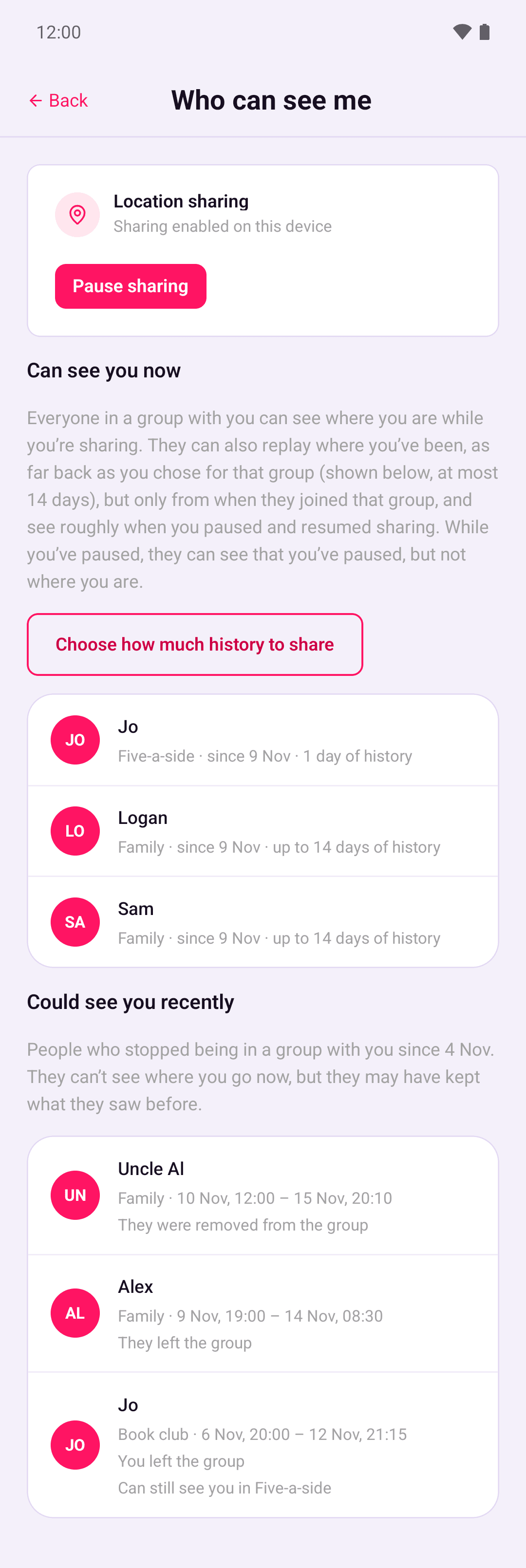
Go to Account › Who can see me. The screen has two lists: people who can see your location now, and people who could in the last 30 days.
Can see you now
Everyone in a group with you can see where you are while you're sharing. They can also play back where you've been in Timeline, as far back as you chose for that group and only from when they joined it. They can see roughly when you paused and resumed sharing.
Each person appears once. Under their name is every group you share with them, the date you've both been in it since, and how much history you share there, for example "1 week of history" or "only your location now". Tap Choose how much history to share to change it. See Location history.
Your location sharing card is at the top of the screen, so you can pause straight away. While you've paused, people in your groups can see that you've paused, but not where you are. See Pause location sharing.
Could see you recently
This list shows each time someone stopped sharing a group with you in the last 30 days:
- who it was
- which group
- when the stretch started and ended
- why it ended: "They left the group", "They were removed from the group", "You left the group" or "You were removed from the group".
A stretch that started more than 30 days ago only shows when it ended, for example "Until 12 Nov, 10:53". Someone who left and rejoined appears once for each stretch. If they still share another group with you, the entry says "Can still see you in" that group.
People who have deleted their account aren't listed, and neither are groups that have been deleted.
The list is built from the same records as Group history. The server stores nothing extra about you to make it.
Someone in this list can't see where you go now, but anything their phone received while you shared a group stays on their phone. Leaving a group can't take back what someone has already seen.
Names and pictures
If you've given someone a nickname, the list shows it, with their account name underneath. See Nicknames and colours. Nicknames only come from groups you're still in.
Pictures only show for people you still share a group with. Everyone else shows as initials. For a group you've left, the list uses the name the group had when you left, even if it has been renamed since.